Phase 1
Learning Issue:
The learning issue I will be addressing is improving the skill of the overhand throw with multimedia technology within a first grade physical education class. Students at the first grade level in physical education have trouble mastering the skill of the overhand throw. Students are able to demonstrate some of the steps of the overhand throw individually, but have trouble performing them all together. Specific learning issues of the overhand throw are:
- Ball in dominant hand
- Flex arm; ball at ear
- Step with opposite foot
- Release ball in forward direction
This project will examine how multimedia technology will help students demonstrate how to properly perform the overhand throw in physical education class.
Evidence of Learning Issue:
My evidence of this learning issue with the overhand throw comes from personal observation, video observation and a county-wide teacher rubric. I collected the data below by observing my students during an overhand throwing game. After observing this activity I completed a teacher rubric about the essential elements of the overhand throw on each student. That rubric and the data colleceted is shown below. After collecting this data, it proves that the majority of students have a difficult time properly performing the overhand throw. For example, 17 out of the 24 students are on a developing or not evident level as shown below. Properly performing the overhand throw is an issue for the my students. When I break down the skill with the essential elements, the students are able to perform each essential element. However, when it is time for my students to put all the essential elements together they are unable to perform the overhand throw. They also have trouble applying the skill in an authentic situation, like an overhand throwing activity. The data below supports my assessment.
County-Wide Teacher Rubric
Essential Elements
· Ball in dominant hand
· Flex arm; ball at ear
· Step with opposite foot
· Release ball in forward direction
|
Level |
|
Criteria |
|
4 |
Proficient/Consistently Evident |
Demonstrates all essential elements with fluid motion |
|
3 |
Competent/Evident |
Demonstrates 3 of the 4 essential elements |
|
2 |
Progressing/Developing |
Demonstrates 2 of the 4 essential elements |
|
1 |
Not Evident |
Demonstrates less than 2 of the essential elements |
Results from Teacher Rubric Pre-Test
|
Student |
Level |
|
MA |
3 |
|
AB |
2 |
|
DC |
2 |
|
MD |
2 |
|
AD |
2 |
|
NF |
3 |
|
SG |
3 |
|
AJ |
1 |
|
RJ |
3 |
|
JJ |
2 |
|
DL |
3 |
|
CM |
3 |
|
KM |
2 |
|
JM |
2 |
|
JPM |
2 |
|
JPG |
1 |
|
ER |
2 |
|
CS |
2 |
|
WS |
2 |
|
DT |
2 |
|
JT |
3 |
|
AW (B) |
2 |
|
AW (G) |
2 |
|
AY |
2 |
Video-Observation from Pre-Test
Students were given a pre-test that consisted of an overhand throwing game. This was to see what knowledge of the overhand throw they retained from Kindergarten and what they already can perform. The video clearly shows students having trouble with certain cues such as: ball by ear, stepping with the opposite foot, and releasing the ball in a forward direction.
Please visit http://www.coachseye.com/rONA to see the pre-test video data.
Description of the School:
Magnolia Elementary School (MAES) is located in a suburban community in Harford County, Maryland. Magnolia Elementary is part of the Harford County Public School District (HCPS). HCPS is a school system comprised of 54 schools and approximately 38,000 students. There are 5 Title I schools in the county and they are all elementary schools. Magnolia Elementary has the highest percentage of poverty students out of all the Title I schools in Harford County. MAES is composed of 385 students from grades Pre-K to fifth. There are 26 teachers at MAES. MAES strives to help each child achieve success.
MAES is a Title I school. A Title I school is a high-poverty school, where at least 69 percent of the students come from low-income families. At MAES, 88.4% of students live in poverty and qualify for free and reduced meals (FARMS). MAES has the highest population of students living in poverty compared to any other school in HCPS. As a Title I school each child in the school is provided free breakfast and a healthy afternoon snack.
MAES is not a very diverse school. 253 out of the 385 students are African American, 32 Hispanic students, 56 Caucasian, and 40 students are 2+ races. One big disadvantage of MAES is there is a 34.5% student mobility rate. This is the percent of students that transfer in or withdrawal during the school year after the first day of school. MAES has a high transient population which can be a factor when it comes to learning.
Magnolia is a very technological advanced school for HCPS. Each classroom is equipped with a Promethean Interactive Whiteboard, document camera, flat screen television and at least 3 computers. There are 2 computer labs at MAES and 3 mobile laptop carts. In the gymnasium technology is very limited. The physical education program is equipped with a discovery cart that consists of: one laptop, speaker system, wireless microphone, DVD player and projector. The physical education department also has a Flip Camera, heart rate monitors and pedometers.
Individuals Involved:
Mrs. Anderson (myself)
I teach this particular first grade class 3 times in 2 weeks for 45 minutes each class. Each time they come to physical education they come as a single class, so there will be no team teaching.
Students
This project incorporates a first grade class that I teach at MAES. There are 24 students in the class, 13 boys and 11 girls. Out of the 24 students in the class 2 speak limited English and 3 have IEP’s. There are an extremely high percentage of FARMS students in this class, with 23 out of 24 students that qualify for FARMS. Students in this class and school do not have a lot of opportunity for recreational sports and outside play. Families cannot afford recreational sports and the neighborhoods the students live in are dangerous and many of them are not allowed to go outside and play. This leads to students that have no experience with skills like the overhand throw and sometimes the first time they learn to throw is in physical education class.
|
Ethnicity |
# of Students |
|
African American |
14 |
|
Caucasian |
3 |
|
Hispanic |
3 |
|
Multiracial |
4 |
Approval:
Below is a copy of the email for approval of the project.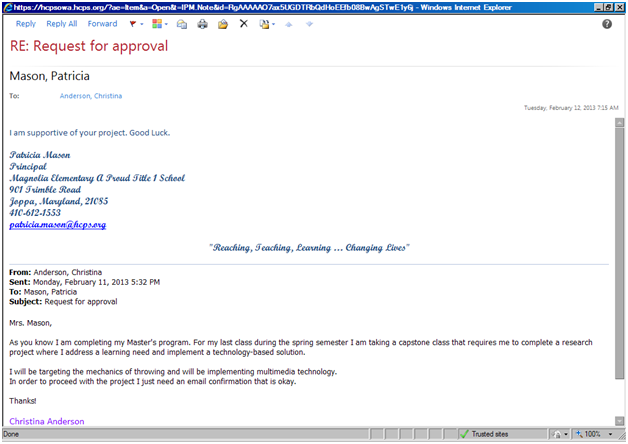
Technology-Based Solution:
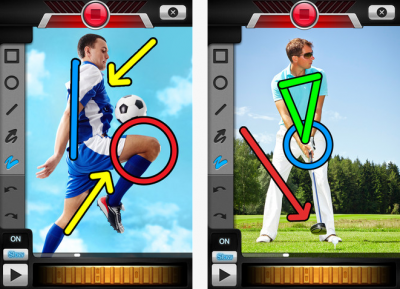
The students and I will use multimedia technology to help them learn how to properly demonstrate how to perform the overhand throw. Videos will be taken to share instant feedback with the students and students will use the video for self and peer assessments. Videos will be analyzed with the students through the application “Coach's Eye”. Coach's Eye is an application where you can analyze videos in real time and slow motion. Photos will also be taken to analyze and discuss the steps of the overhand throw. All the videos and photos will be taken with my personal iPad, so I can have access to the “Coach’s Eye” application. When showing the videos to individual students they will be viewing them through the iPad. When showing the class a video the iPad will be hooked into a projector on my Discovery Cart and shown through there. I chose the "Coach's Eye" video application because it is very interactive. I am able to pause a video and show it in slow motion. I am also able to analyze skills further by placing arrows, circles and lines on the video.
Below is an example of the Coach's Eye application
Below is an example of the Discovery Cart that I will use to project the Coach's Eye videos
Literature Review:
Abstract
Multimedia technology is becoming more popular in physical education classrooms. Video and photo technology is extremely helpful demonstrating new skills, recording student’s performances and assessing students. Multimedia technology is not only a good teacher tool but it also helps engage students. Yaman (2008) explains how “studies showed that the use of technology in physical education as a teaching tool could be useful for both the teachers and the students” (p. 21).
McKenzie (1993) suggests how “video technology has been shown to be successful in enhancing learning and motivation with at-risk students” (p. 238). Since the students I work with are at-risk / high poverty this is another positive factor about implementing this technology in physical education class. Myers, Wang and Yanes (2010) discusses how using multimedia technology in physical education can not only “improve motor skills but also develops thinking skills, creativity and problem solving skills” (p. 353). Multimedia technology in the gym can really bring learning to a higher level.
Multimedia for DemonstrationsMultimedia technology is a great way to teach students skills by showing demonstrations. This will help students envision what a new skill or activity can look like. Anderson (2001) states that “watching a digital video recording would provide a better overview than a teacher’s description alone” (p. 19). Using multimedia for demonstrations can also help “when the teacher is unable to personally demonstrate the skills (gymnastics, self-defense, springboard diving)” (Croom & McKenzie, 1994, p. 138). Croom & McKenzie (1994) also discusses how multimedia demonstrations are useful when teachers “are not familiar with the activity (dances, lummi sticks, tinikling)” (p. 138). Not all physical education teachers are able to demonstrate all the skills they teach, so multimedia demonstrations will ensure that students are still receiving a quality demonstration.
Visual demonstrations can also be shown through video podcasting. According to Shumack (2011) “video podcasting is a video file that can be played back on a portable audio device” (p. 39). A video podcast is convenient for students because they are able to access it outside of school. Video podcasts lets students “review skills outside of the classroom” and “enhances mental practice by students watching the video and then imagining themselves performing the skill exactly as it is demonstrated” (Shumack, 2011, p. 39).
With all the journal articles there is little data on how multimedia technology in physical education impacts learning. Baca, Leser and Uhlig (2011) conducted a study containing 35 participants that were enrolled in a soccer course. Half of the students were taught with no technology and the other half had multimedia technology (animations) that were used to help teach technique and tactics. After data was gathered there were no significant differences between the two groups. Baca, Leser and Uhlig (2011) found that results from a questionnaire “showed positive agreement among the participants in the usability and assistance of multimedia technology in the course” (p. 184). Even though there is little data supporting an increase in learning from multimedia technology in physical education we do know that by using multimedia for demonstration purposes can help students “increase their understanding and motivation” (Anderson, 2001, p. 19).
Record Student Performance
A common use of video and photo technology in physical education and athletics is for recording student performance. In physical education class teachers can videotape students performing skills and then use the video to provide feedback to the students. Video feedback can have several benefits for the students. “Video feedback has been statistically proven to increase a person’s ability to learn and perform motor skills” (Banville & Polifko, 2009, p. 17).
There are several ways physical education teachers can use video for feedback on the students’ performance. Anderson (2001) suggests that “intermediate or advanced skilled students can analyze their own movement and share their understanding with the teacher, by discussing drills or practice strategies that they can do to improve their skills” (p. 19). Another way feedback can be given using video technology is by “self-assessment or guidance of a teacher, students can observe their performance strengths and weaknesses or watch their performances over a period of time to check on their development” (McKenzie, 1993, p. 239). This helps get the students involved with the technology and involved with their own learning. Thomas & Stratton (2006) suggest that videos can be analyzed with “kinematic software and the movements can be further analyzed and provide feedback to the student” (p. 627).
Myers, Wang and Yanes (2010) conducted a case study on how to include technology to provide feedback in a large physical education class. Forty-five students, age range of 19-30 years enrolled in a college sports course were recorded on video on their skill of a golf swing. Video software like Coach’s Eye was used to provide instant feedback. Students were given a questionnaire to assess their perception of incorporating the video technology in their lessons. “4.7 out of 5 possible points showed students’ strong support for the usefulness of the high end technologies in learning the golf drive skill” (Myers, Wang & Yanes, 2010, p. 354). Students also showed great interest in observing their own performances.
Multimedia for Assessment
Video technology was used for part of my pre-test data/assessment. This will serve as baseline data for students and drive my teaching during the next few lessons. Multimedia technology can be a convenient way for physical education teachers to assess students. It is common for a physical education teacher to videotape students performing skills and then going back to assess the students after the class left. Sometimes it is hard for one teacher to watch twenty-five students perform a skill and assess them using a teacher rubric, while trying to still teach. Anderson (2001) suggests that “these recordings could also be used to discuss progress or goals with the students and show parents during parent-teacher conferences" (p. 19).
Videos taken for assessments can be transferred to video analysis software to help complete assessments. The software can offer features like “slow motion replay and stop action, where the performance can be examined repeatedly. Unlike an athlete, a video recording will not tire with repeat performances” (Wilson, 2008, p. 36). A video was used to compile data for my pre-test. The video allowed me to take the time to assess my students instead of rushing to assess them while they were playing the game.
Conclusion
Multimedia technology can be used in physical education class to demonstrate new skills, record student performance and assess students. Even though there is little data supporting an increase in learning from multimedia technology in physical education we do know by using multimedia technology in physical education can help students “increase their understanding and motivation” (Anderson, 2001, p. 19). Multimedia technology in physical education can allow teachers to provide instant high- quality feedback to students, students can review their performance to complete a self-assessment and teachers can assess the students at a later time with a video recording. No matter what kind of technology is used in physical education all the research did suggest that “teachers must get the necessary training and support to have an understanding and a vision on the role of technology in education” (Yaman, 2008, p. 22). The effectiveness of multimedia technology as a teaching tool relies on teachers receiving the proper training.
References:
2012 Maryland report card. (2013, February 6). Retrieved from http://mdreportcard.org/Demographics.aspx?K=120131&WDATA=School
(2012). Coach's eye. (2012). [Web Graphic]. Retrieved from http://static2.businessinsider.com/image/5037bd9ceab8ea424000001c-400-300/coachs-eye.jpg
Anderson, M. (2001). Digital video production in physical education and athletics. The Journal of Physical Education, Recreation & Dance, 72(6), 19. Retrieved from https://www.amazon.com/gp/ays?asin=B0008I871S&viewShared=0&targetCustomerId=A13HHIMNQ9G802
Baca, A., Leser, R., & Uhlig, J. (2011). Effectiveness of multimedia-supported education in practical sports courses. Journal of Sports Science and Medicine, 10(1), 184-192. Retrieved from http://ehis.ebscohost.com.ezproxy.umuc.edu/eds/pdfviewer/pdfviewer?sid=791730c2-1fd1-4191-9336-2977ebf98a04@sessionmgr12&vid=3&hid=17
Banville, D., & Polifko, M. (2009). Using digital video recorders in physical education. Journal of Physical Education, Recreation & Dance, 80(1), 17-21. Retrieved from http://ezproxy.umuc.edu/login?url=http://search.ebscohost.com/login.aspx?direct=true&db=a2h&AN=36168343&login.asp&site=ehost-live&scope=sit
Croom, A., & McKenzie, B. K. (1994). Video and the physical education curriculum: Creative classroom applications. Physical Educator, 51(2), 138-143. Retrieved from http://ezproxy.umuc.edu/login?url=http://search.ebscohost.com/login.aspx?direct=true&db=hxh&AN=9411092408&login.asp&site=ehost-live&scope=site
Magnolia elementary school profile. (2012). Retrieved from http://www.hcps.org/schools/SchoolProfile.aspx?schoolID=31
McKenzie, B. K. (1993). Ten innovative uses of video with at-risk students. Clearing House, 66(4), 238-240. Retrieved from http://ezproxy.umuc.edu/login?url=http://search.ebscohost.com/login.aspx?direct=true&db=eric&AN=EJ466681&login.asp&site=ehost-live&scope=site
Myers, D., Wang, L., & Yanes, M. J. (2010). Creating student-centered learning experience through the assistance of high-end technology in physical education: A case study. Journal of Instructional Psychology, 37(2), 352-356. Retrieved from http://ezproxy.umuc.edu/login?url=http://search.ebscohost.com/login.aspx?direct=true&db=eric&AN=EJ952143&login.asp&site=ehost-live&scope=site
Shumack, K. A. (2011). Video podcasting in physical education: This method can expand the use of visual demonstrations for teaching and practicing movement skills. Journal of Physical Education, Recreation & Dance, 82(1), 39-44. Retrieved from http://www.amazon.com/gp/product/B004MFZPE0
Stratton, G., & Thomas, A. (2003). What we are really doing with ICT in physical education: A national audit of equipment, use, teacher attitudes, support, and training. British Journal of Educational Technology, 37(4), 617-632. doi: 10.1111/j.1467-8535.2006.00520.x
Wilson, B. D. (2008). Development in video technology for coaching. Sports Technology Journal, 1(1), 34-40. doi: 10.1002/jst.9
Yaman, C. (2008). The abilities of physical education teachers in educational technologies and multimedia. The Turkish Online Journal of Educational Technology, 7(2), 20-31. Retrieved from http://ezproxy.umuc.edu/login?url=http://search.ebscohost.com/login.aspx?direct=true&db=ehh&AN=31781383&login.asp&site=ehost-live&scope=site

