Phase 3
Instructional Strategies and Methods
The primary method used to teach will be the directed method of teaching. Students will be individually learning the overhand throw. Students are already highly motivated to learn the skills of the overhand throw because they enjoy the activities that we participate in during the lessons. Students at the school are always motivated to participate in physical education activities. In first grade, students are first learning the cues of the overhand throw. Some students can perform an overhand throw, but do not correctly follow the cues. Directed instruction will help ensure that all students are learning the specific cues they need in order to demonstrate the overhand throw. By choosing directed instruction it helps make sure students are going to get through all three lessons (4 classes) since I only see the students 1-2 times a week depending on the schedule.
I will also be using some constructivist models too. I will be facilitating some of the learning when students are interacting with the Coach's Eye videos. Students will be analyzing videos on their own and as a class to further their learning of the cues. I will be facilitating this so students can start to identify the cues on their own. Students will also be working in partners during two lessons where they will be helping each other with the skill of the overhand throw.
Below are some strategies that will be used during instruction.
Whole-Group Instruction
Whole-group instruction will be used for skill demonstrations to discuss the cues of the overhand throw, viewing of videos and discussions about skill analysis shown.
Individual Instruction
Students will work independently the majority of time to practice the overhand throw. They will also work independently to complete all the assessments. They will also view a video of their self throwing independently in order to complete their self-assessment.
Grouping
During lesson two students will be participating in throwing stations. Students will be working with a partner at some of these stations. Partners will be purposely grouped by skill level. Lower skilled students will be paired up with higher skilled students. By doing this the higher skilled students will be able to help the lower skilled students with the stations.
Feedback (Teacher & Self)
The teacher will provide feedback to the students throughout all three lessons on their overhand throws. The teacher will provide feedback by showing students video clips of their overhand throwing performance and referring to the cues of the overhand throw. Students will watch a video clip of their self throwing in order to identify what cues they are following correctly and provide one cue they need to improve. This will be assessed with a self-assessment and a teacher rubric.
Demonstrations
A variety of visual demonstrations will be used throughout the lessons. Other students and I will show demonstrations of the overhand throw. Multimedia video demonstrations will also be shown through the iPad and projector. These demonstrations will be of older students in the school and students in the class. Demonstrations will be shown at various times in the beginning, middle and end of lessons. Class discussions will take place about the cues.
Diverse Needs
Using multimedia technology will help with meeting the diverse needs of the students. Three students have an IEP and 2 speak limited English. None of these students need assistive technologies. If I were to have a student that needed assistive technologies I could reach out to our county’s adaptive physical education specialist who would help adapt the lessons for the student and provide any necessary equipment. Students will able to see the overhand throw demonstrated a number of ways. They will be able to see the overhand throw demonstrated by the teacher, peers and video demonstrations. I will show a number of video demonstrations analyzing the cues of the overhand throw. These videos will be taken of other students and each student will be able to view a video of themselves demonstrating the overhand throw. Some of the videos will be narrated with my voice analyzing the cues and each cue in the video will be identified with a graphic for more visual understanding. Other videos will be analyzed by the students and they will point out the cues and use the video program to identify the cues. During lessons/practice I will stop the students to revisit the cues and show a quick video clip to help clarify understanding and modeling of the cues. By including multimedia technology into my lessons my limited English students and IEP students will be able to see what they are learning, which helps them learn visually.
On the assessments I added pictures of the cues, so students can identify the cues easier. I will also use pictures next to the cues on the overhand throw poster that will be put up around the gym. All of the assessments will also be read out loud. I will keep the five students that have IEP’s or speak limited English near me during assessment, so I can provide additional help if they have any question. I will have pictures and poster cues up around the gym so students can refer to them during the lessons.
There are a lot of behavior issues at my school and the majority of my students are from high poverty situations. To limit the amount of behavior issues, I will limit any down time. All of my equipment and technology will be set up and ready to go. McKenzie (1993) suggests how “video technology has been shown to be successful in enhancing learning and motivation with at-risk students” (p. 238). By incorporating multimedia technology into the lessons, this will help decrease any discipline issues because students will be motivated to learn using the technology.
Technology Resources
iPad- I will be using my personal iPad for this project. The iPad will be used to take video and photographs. The videos will be projected through the Discovery Cart and some will be viewed through the iPad itself.
Discovery Cart- A Discovery Cart consists of one laptop, speaker system, wireless microphone, DVD player and projector. This is owned by the Physical Education department, so it will always be available.
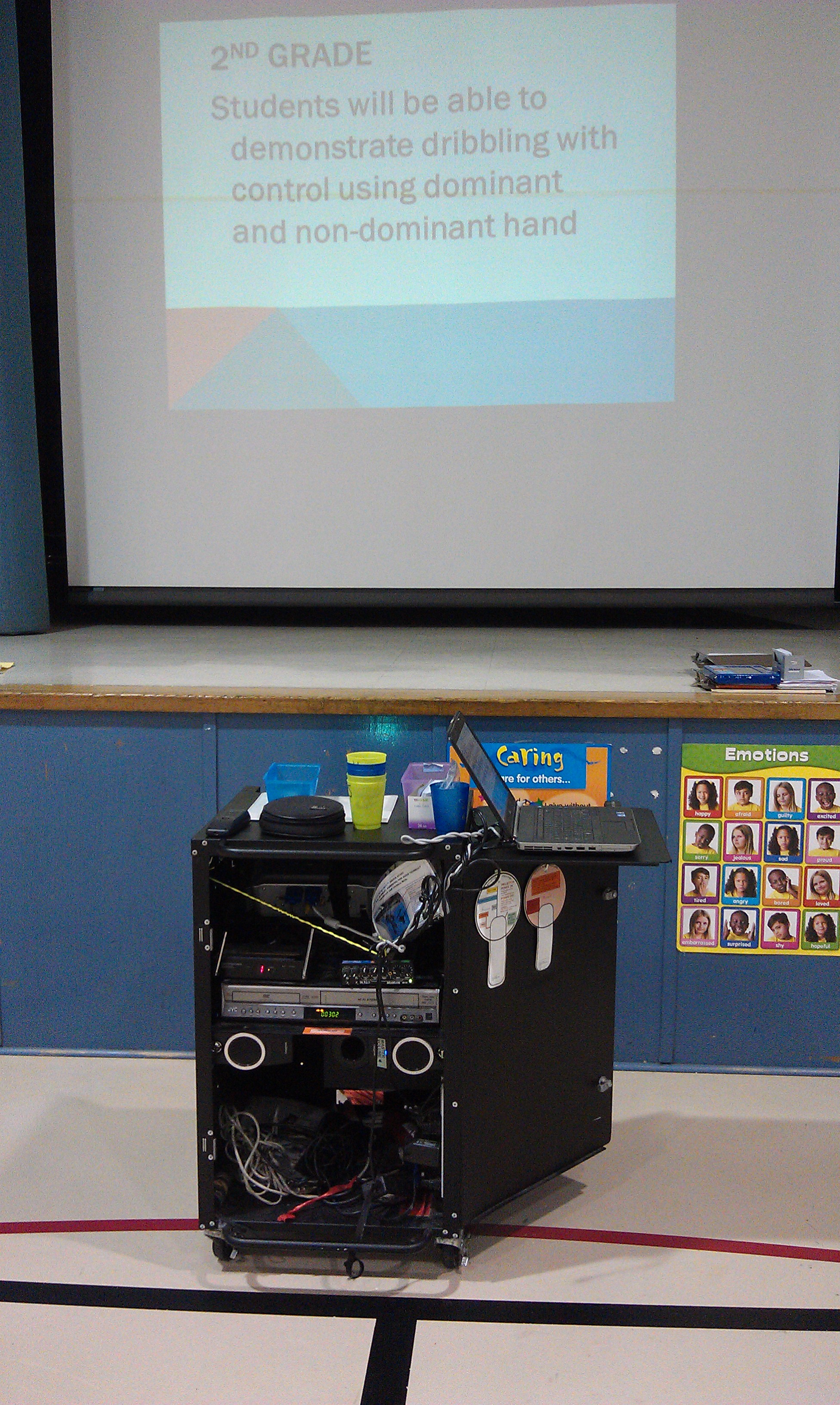
VGA Adapter- This cord will hook the iPad up to the projector, so videos can be viewed on the large screen.
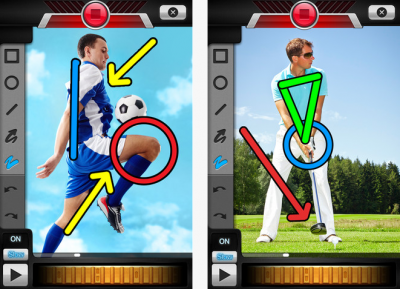
Coach’s Eye Application- Coach's Eye is an application where you can analyze videos in real time, pause it and play it in slow motion. You can also analyze skills further by placing arrows, circles and lines on the video. Videos can also be narrated to further describe/analyze the skill.
Access Plan
The lessons will be taking place in the gymnasium. The Discovery Cart will be used to project the videos from the iPad. I will bring in my personal iPad to use for this project since my school does not have any. The iPad already has the Coach’s Eye application downloaded on it, so no Internet access will be needed which is helpful as we do not have access to the Internet in the gymnasium.
Implementation Plan
|
Lesson Plan # 1
|
Cues of the Overhand Throw |
|
Goal |
Students will be able to identify the cues of the overhand throw. |
|
Objectives |
After practicing the overhand throw, students will be able to correctly identify the four cues of the overhand throw. |
|
Time |
1 Class 45 minutes |
|
Activities/Procedures |
1. Students will be taught the cues of the overhand throw by reviewing the poster and shown a visual demonstration of each cue.
2. Students will view coach’s eye video of the overhand throw. Video will be narrated with cues and cues will be identified with graphics. 3. Students will practice individually the overhand throw. Students will be throwing at different targets on the walls and at different distances. 4. Students will practice throwing back and forth with a partner at different distances.5. Several students will be videotaped throughout the practice time and shown their video for feedback.6. After practice students will be shown another video of the overhand throw (no narration or graphics) and this time will have to identify the cues of the overhand throw. The video will be paused throughout and students will be called up to circle the cues demonstrated. |
|
Assessment |
Students will participate in a written assessment on the cues of the overhand throw. |
|
Lesson Plan # 2 |
Overhand Throw Self-Assessment |
|
Goal |
When watching a video clip of their overhand throw performance, students will identify one improvement they need to make. |
|
Objectives |
After reviewing a video of themselves demonstrating the overhand throw, the students will be able to identify one improvement they need to make by completing a self-assessment. |
|
Time |
2 Classes- 45 minutes each |
|
Activities/Procedures |
1. Students will review the steps of the overhand throw. 2. Several students will be called up to demonstrate the overhand throw. 3. Students will be shown a “Coach’s Eye” video of the overhand throw and will have to identify the cues of the overhand throw. 4. Students will participate in a variety of overhand throwing stations. Stations will be set up throughout the gym. While the students are participating at the stations, I will be taking video clips of each student throwing overhand. 5. After the clips are taken, students will be called over to view their video clip (on the iPad) and to fill out their self-assessment. While students are viewing the video clip and filling out the self-assessment, I will also discuss their throw with them and provide them feedback. 6. Since this will take a longer time because I want to meet with every student this lesson will take place over 2 class periods. |
|
Assessment |
Students will complete a self-assessment of their overhand throw. The self-assessment will be evaluated with a teacher rubric. |
|
Lesson Plan # 3 |
Demonstrate Overhand Throw |
|
Goal |
Students will be able to demonstrate an overhand throw with opposition. |
|
Objectives |
During an overhand throwing activity, students will be able to correctly demonstrate the four steps of the overhand throw. |
|
Time |
1 Class- 45 minutes |
|
Activities/Procedures |
1. Students will review the steps of the overhand throw. 2. Several students will be called up to demonstrate the overhand throw. 3. Video clips of students in the class will be shown to demonstrate a correct overhand throw. I will analyze each video clip with the students using Coach’s Eye. 4. Students will participate in an overhand throwing game called “Pizza Delivery”. This is an overhand throwing game where the class is split into two teams and they are trying to throw yarn balls into targets on the other side of the gym. 5. While students are participating in the game I will be assessing the student’s overhand throw. I will also take several video clips of the students. |
|
Assessment |
Students will demonstrate the overhand throw during the Pizza Delivery game. This assessment will be evaluated with a teacher rubric. |
Instructional Materials
Poster with the Cues

Coach’s Eye video with audio and cues http://www.coachseye.com/oItU
Coach’s Eye video with no audio or cues http://www.coachseye.com/Equ1
Physical Education Equipment (vary lesson to lesson)
Basket of Yarn Balls
Pack of Dome Cones
12 Hula Hoops
Floor tape (for targets)
2 Footballs
4 Scoops
Pop-Up Bullseye Target
Grab and Catch Balls
Two stand up targets
4 Tennis Balls
Logistical Plan
There are a few logistical issues that could arise, especially with the use of technology. I will always have a back-up plan just in case.
If the iPad is not working correctly or the Coach’s Eye application, I will have a Flip Camera ready for backup, so I can still show and record videos.
Discovery Cart is not working correctly. My school has two other Discovery Carts that I would be able to use. I will have another one reserved, just in case this happens.
Laptop is not working correctly. I have a backup laptop on reserve to use from the mobile laptop cart.
The gym is frequently asked to be used for school events and assemblies; therefore I would have to go outside. I have contacted my assistant principle to make sure the gym would not be used on these dates. All the dates were clear.
Parent permission slip of student media shared with the public. Parents need to sign this permission slip in the beginning of the year for permission of videos or pictures of their child be shared with the public. One student in the class is not allowed to have media taken of them and shared with the public. I am still able to video tape them for classroom data/work, but any video loaded into the Coach’s Eye website cannot contain them.
Timeline Overview & Deadlines
|
Lesson Topic
|
Date |
Time (45 minutes) |
|
Lesson 1-Cues of Overhand Throw |
Wednesday March 27 |
Full Class Period |
|
Spring Break |
March 29- April 3 |
|
|
Lesson 2- Self-Assessment |
Friday April 5 |
Full Class Period |
|
Lesson 2- Self-Assessment |
Wednesday April 10 |
Full Class Period |
|
Lesson 3-Demonstrate Overhand Throw |
Friday April 12 |
Full Class Period |
References
McKenzie, B. K. (1993). Ten innovative uses of video with at-risk students. Clearing House, 66(4), 238-240. Retrieved from http://ezproxy.umuc.edu/login?url=http://search.ebscohost.com/login.aspx?direct=true&db=eric&AN=EJ466681&login.asp&site=ehost-live&scope=site
