Phase 5
During phase 5 I will be summarizing the data I’ve collected for every assessment. The data is represented below in a variety of graphs. I will discuss what the data shows and how successful my students were for each objective. An explanation will also be provided on why I think my students were so successful for each objective. Several recommendations will also be discussed for future revisions, how I will get others to adopt my innovation and what future research I would suggest being conducted based on the results of this project.
Summary of Data & Data Interpretation
Objective 1: After practicing the overhand throw, students will be able to correctly identify the four cues of the overhand throw.
Figure 1
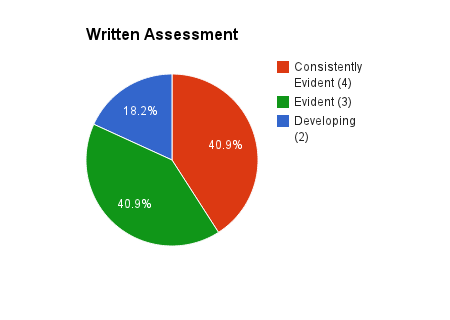
Figure 2

To assess objective 1 the students completed a written assessment. In the written assessment students needed to identify the cues of the overhand throw. Figure 1 summarizes the data from this assessment. This assessment was graded by the number of answers the student got right. The highest score was 6, since there were 6 questions. A student example of the written assessment for objective one is shown above in Figure 2.
As you look at the pie graph there are three colors: red, blue, and green. The red is for consistently evident (4), which is 5-6 answers correct. The green is evident (3), 4 answers correct and blue are developing (2), 3 or fewer answers correct. Of the entire class 40.9% (9 students) of the students were consistently evident. 40.9% (9) of the students were also evident and 18.2% (4) of the students were developing.
To meet this objective students needed a score of evident (3) or higher. According to the data, 81.8% of the students achieved this objective, 18 of the 22 students. This showed me that the majority of the students were able to identify the cues of the overhand throw. Four of my students did not meet this objective. Part of the reason for this was students had a hard time completing the assessment due to the format of the 2nd question, where students had to put the cues in the correct order. When completing this assessment I received a lot of questions on how to answer number 2. After several questions I explained it to the class as a whole. Some of the students, who didn’t ask me for help or didn’t understand my explanation, just went down the line and put 1, 2, and 3. The example in Figure 2, the student did complete it correctly after she asked a question about it and was provided further explanation. One my recommendations below are to revise the written assessment. I believe the number of students who did not meet this objective would be lower if this assessment were to be revised.
To also add to the success of objective one was the Coach’s Eye technology. Throughout this lesson I showed several Coach’s Eye videos and had students use the iPad to identify the cues. This helped reinforce what we were learning and helped students actually see and identify the cues.
Objective 2: After reviewing a video of themselves demonstrating the overhand throw, the students will be able to identify one improvement they need to make by completing a self-assessment.
Figure 3
Figure 4 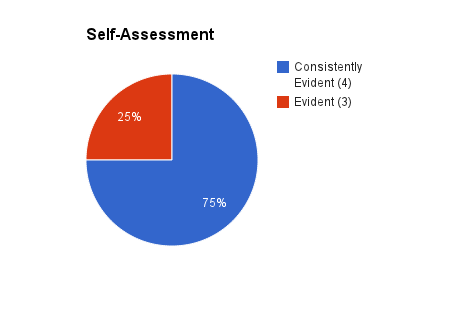

To assess this objective the students completed a self-assessment after watching a video clip of themselves in the Coach’s Eye app on the iPad. The self-assessment had students identify the cues they demonstrated and identify one improvement they needed to work on for their overhand throw. This assessment was evaluated from a rubric. This rubric is shown on phase 4. Figure 3 represents the data I collected from this assessment. A student example is also shown in Figure 4.
The pie graph of the data shows that 100% of the students met this objective with a grade of evident (3) or higher. 75% of the class (15 students) received a score of consistently evident (4) and 25% of the class (5 students) had a score of evident (3). No students received a developing (2) or not evident (1) score according to the rubric.
This assessment was based around the use of technology with the iPad and the Coach’s Eye technology. Without this technology this assessment would not have been as successful. Students completed this assessment one at a time since I only had one iPad. Students were very excited to watch their video clip and enjoyed using Coach’s Eye to identify the cues they demonstrated and needed to work on. Since the video clips were only a few seconds long students were able to watch their video clip several times to complete their self-assessment. Not one student had trouble with completing the checklist of the cues. Even the students that demonstrated every cue were still able to identify one thing they needed to work on for the overhand throw. I only had one student not be able to do this and wrote “I don’t know”. Most students that demonstrated all of the cues wrote improvements such as throwing farther, faster, or twist hips more. The other students were able to identify the one cue they had to put an X by because they did not demonstrate it in the video.
This assessment data showed that the students understood the cues of the overhand throw and are able to recognize the parts of the overhand throw through this video. Students used this self-assessment to be able to identify what they needed to practice in order to demonstrate the overhand throw correctly for the next assessment. This directly aligns with the studies that have been done on video feedback. “Video feedback has been statistically proven to increase a person’s ability to learn and perform motor skills” (Banville & Polifko, 2009, p. 17). This will be shown with the results from the next assessment.
Objective 3: During an overhand throwing activity, students will be able to correctly demonstrate the four steps of the overhand throw.
Figure 5

This objective was assessed during the final lesson. I conducted a teacher observation of the students throwing while they were participating in a game activity. The teacher observation of the overhand throw was evaluated with a teacher rubric shown in phase 4. Students could earn consistently evident (4), evident (3), developing (2), or not evident (1). Students were also observed the same way for their pre-test data.
This data is shown above in the bar graph comparing the pre-test and post-test data results. In the pre-test, 0 students were consistently evident (4), but in the post-test 10 students were consistently evident. In the category of evident (3) during the pre-test, 7 students were evident and in the post-test there were 13 students. In the pre-test 15 students were developing and there were 0 in the post-test. During the pre-test there was also 1 student not evident and 0 during the post-test. These results show that all students met this objective of demonstrating the overhand throw by all students earning an evident (3) or higher according to the rubric.
The technology based solution was the major reason students were so successful with meeting this objective. Students were shown a variety of demonstrations through the iPad and students were able to analyze the skill of the overhand throw through the Coach’s Eye application. This helped students really learn and understand the skill better, which resulted in them demonstrating it correctly. Myers, Wang and Yanes (2010) discusses how using multimedia technology in physical education can not only “improve motor skills but also develops thinking skills, creativity and problem solving skills” (p. 353). Multimedia technology in the gym can really bring learning to a higher level.
Recommendations
Revisions
After completing this project I would make the following revisions.
Older Grade Level
I would like to use this project with an older grade level. They could use the technology more independently, instead of my having to guide them. It was difficult to use the technology one on one with a student, while others are participating in the physical education activities.
Co-Teaching
This could also be used in a co-teaching situation. In physical education it is not uncommon to co-teach since sometimes we have double classes. Since it was hard to have the younger students interact at times with the iPad, this could work better in a co-teaching situation. One teacher could be having the student use the technology while the other teacher monitors the activities.
More iPads
Having access to more iPads would be beneficial. Ideally, it would be wonderful to have a class set of iPads. Then students could simultaneously complete skill analyzing and self-assessments on their own iPad. Even enough iPads for half of the class would work as well. I can imagine sets of partners having their own iPad videotaping each other performing a skill and then loading the video into Coach’s Eye to provide each other with peer assessments.
Revision of Written Assessment
I would revise the written assessment for the section that they have to put the cues in order. Some students went down the section and just put 1, 2, and 3. This could be organized easier for the students by asking them in question format with 3 multiple choice answers.
Adoption of Innovation
This is how I could get others to adopt my innovation.
Professional Development
Three times a year we have physical education professional development meetings. My supervisor is always looking for teachers to present. I could volunteer to present my capstone portfolio to show how teachers can integrate iPads and the Coach’s Eye application into their teaching and show how it can impact student learning.
County SharePoint Website
Our county has a website that files and documents can be uploaded and shared with the entire county. I could upload my capstone portfolio link to this so teachers could access it at any time.
Maryland Physical Education Conference
Every year there is a Maryland Physical Education conference that teachers can give presentations at on any physical education topic. I have considered after this project that I could pair up with co-workers and give a presentation on Apps to use in P.E. I know several other colleagues use different apps when teaching and we could join together to create this presentation. I can use the data I collected to show how it has a positive impact on student learning.
Future Research
This is the future research I would like to conduct or suggest be conducted on my results.
Various Psychomotor Skills
I am curious to see if the Coach’s Eye application would be just as effective on other physical education psychomotor skills. It would be interesting to compare the data among different skills to see if it has the same effect on the students learning. This would be very important for other physical educators to see, so it can show how effective the technology is. It could also help support physical education teachers asking their principles for an iPad for their program.
Motivation, Behavior, and Engagement
Using iPads in a physical education environment could influence student’s motivation, behavior, and engagement. I noticed my students were highly engaged and well behaved when interacting with the iPad. It would be interesting to conduct a study on these effec. A title one school with major behavior issues like I work in can extremely benefit from a study like this. This could provide more behavior management strategies for teachers and help them provide positive learning experiences for their students.
ESOL Students
How the Coach’s Eye application and iPad increases learning in ESOL students. I noticed that both of my ESOL students increased from a developing level to an evident level. I am curious to see if the technologies would have the same positive impact on the majority of ESOL students.
Conclusion
It was clearly evident that the use of the iPad and the Coach’s Eye application was an advantage for the students. The learning issue of students not performing the overhand throw correctly was met with the help of the technology based solution of the iPad and the Coach’s Eye application. All of the students showed success demonstrating the overhand throw and met all of the objectives of the unit with the help of the technology based solution.
Multimedia technology can be used in physical education class to demonstrate new skills, record student performance and assess students. Even though there is little data supporting an increase in learning from multimedia technology in physical education, we do know by using multimedia technology in physical education can help students “increase their understanding and motivation” (Anderson, 2001, p. 19). Multimedia technology in physical education can allow teachers to provide instant high-quality feedback to students, students can review their performance to complete a self-assessment and teachers can assess the students at a later time with a video recording. Multimedia technology can be a highly effective teaching tool as shown throughout this project.
References
Anderson, M. (2001). Digital video production in physical education and athletics. The Journal of Physical Education, Recreation & Dance, 72(6), 19. Retrieved from https://www.amazon.com/gp/ays?asin=B0008I871S&viewShared=0&targetCustomerId=A13HHIMNQ9G802
Banville, D., & Polifko, M. (2009). Using digital video recorders in physical education. Journal of Physical Education, Recreation & Dance, 80(1), 17-21. Retrieved from http://ezproxy.umuc.edu/login?url=http://search.ebscohost.com/login.aspx?direct=true&db=a2h&AN=36168343&login.asp&site=ehost-live&scope=sit
Myers, D., Wang, L., & Yanes, M. J. (2010). Creating student-centered learning experience through the assistance of high-end technology in physical education: A case study. Journal of Instructional Psychology, 37(2), 352-356. Retrieved from http://ezproxy.umuc.edu/login?url=http://search.ebscohost.com/login.aspx?direct=true&db=eric&AN=EJ952143&login.asp&site=ehost-live&scope=site
